Build your first site
Give your site a name, then start with a design and review it privately.
Steps
If the menu is hidden, click Open menu first.
- As the account owner, open Plan and sites to find Create a site. If your account has no sites, this step opens after sign-in. Fill in Site name, Web address and Time zone, then click Create site. The address will be under keelpage.com; you can’t change it later, but you can add your own domain. As you type, Keel says under Web address whether it is free, for example “trillium-dental.keelpage.com is free”. If another site has it, Keel says “That address is taken. Try trillium-dental-2”; choose the suggestion to use it. A deleted site’s address is free as soon as the site is deleted.
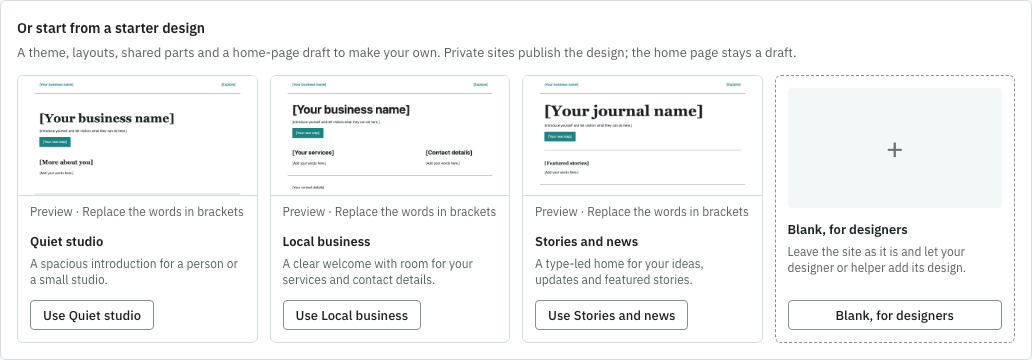
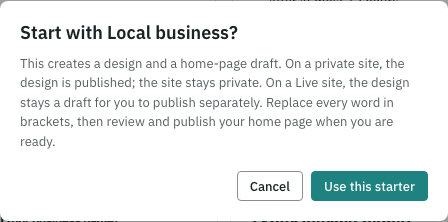
- On How should it be built?, click Choose a starter design. For a business site, click Use Local business, review the confirmation and click Use this starter. You’ll get a design and a home-page draft. The site stays private.
- Open Pages from the menu and open the home page. Replace every word in brackets with your own words. Review the page before publishing it.
- If a helper will build the design, choose Connect an AI helper instead and follow the AI helpers guide. Blank, for designers leaves the design for your designer or helper to add.
If something goes wrong
If an address is refused, choose another and try again. If creation reaches your plan’s site allowance, ask the account owner to review Billing. If a starter fails, click Reload designs and choose again. A starter needs a site with no existing design.