Invite people
Give someone a role on your site, with only the access they need.
Steps
If the menu is hidden, click Open menu first.
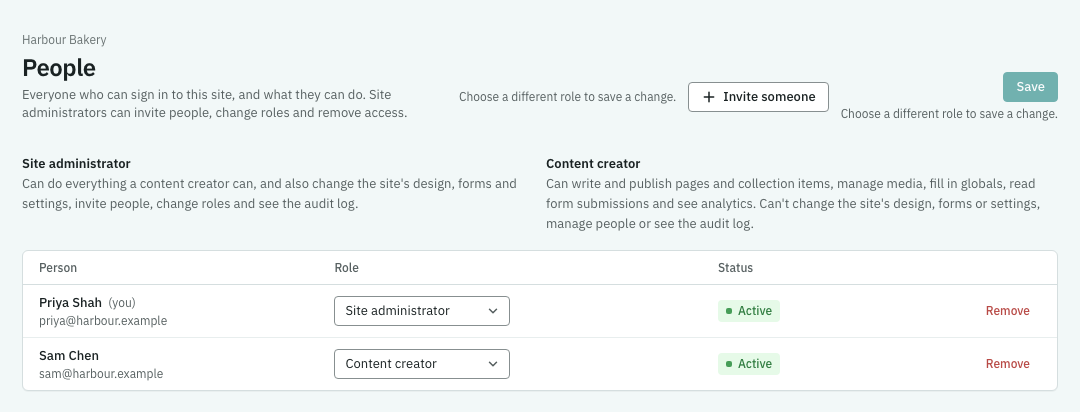
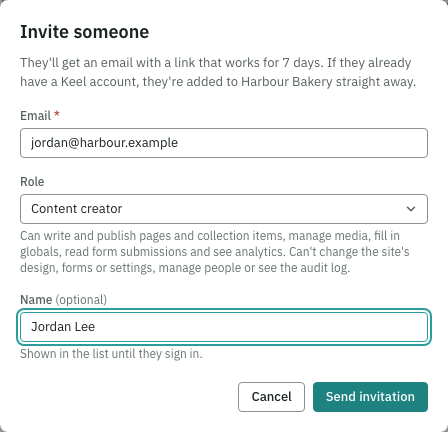
- As a site administrator, open People and click Invite someone. You’ll see the invitation form.
- Enter their Email, choose a Role and optionally enter their Name. Read the role’s explanation and choose only the access they need.
- Click Send invitation. The person receives an email link. If they already have a Keel account, they are added straight away.
- Ask them to open the invitation email and sign in. Return to People to check who has access and their role.
If something goes wrong
If the invitation is refused, check the address and the message shown. If the plan’s allowance of people is reached, ask the account owner to review Billing. Ask the person to check junk mail and use the invitation email. If you can’t open People, ask a site administrator to invite them.